
Filers & recipients
Check Tax ID
Check up to ten arbitrary legal-name and EIN, SSN or ITIN combinations and keep a printable report.
In this guide
Before you start
Before you begin
Have the legal name, ID type, nine-digit Tax ID and enough verification credits for every row.
View all setup requirements
- Account Admins, Managers and Preparers can run checks. Viewers can review existing results.
- Real-time TIN matching must be enabled and the account must have enough verification credits.
Run a standalone check
Open Recipients > Tools > Check Tax ID. No active filer or tax year is needed.
Enter a legal name, ID type and nine-digit Tax ID in each row you want checked. Correct any inline errors before submitting; the first invalid field is focused when you try to check. Leave unused rows empty; Add row allows up to ten. Remove duplicate combinations.
Review the number of checks and credits. Choose Check Tax IDs; if more credits are needed, Account Admins and Managers are prompted to buy a pack. The checkout selects a pack that covers your requested checks. Once payment is confirmed, those checks start automatically. Canceling keeps your entries without running them; buying credits directly from the toolbar only adds credits. Other Preparers can ask an Account Admin or Manager to add credits.
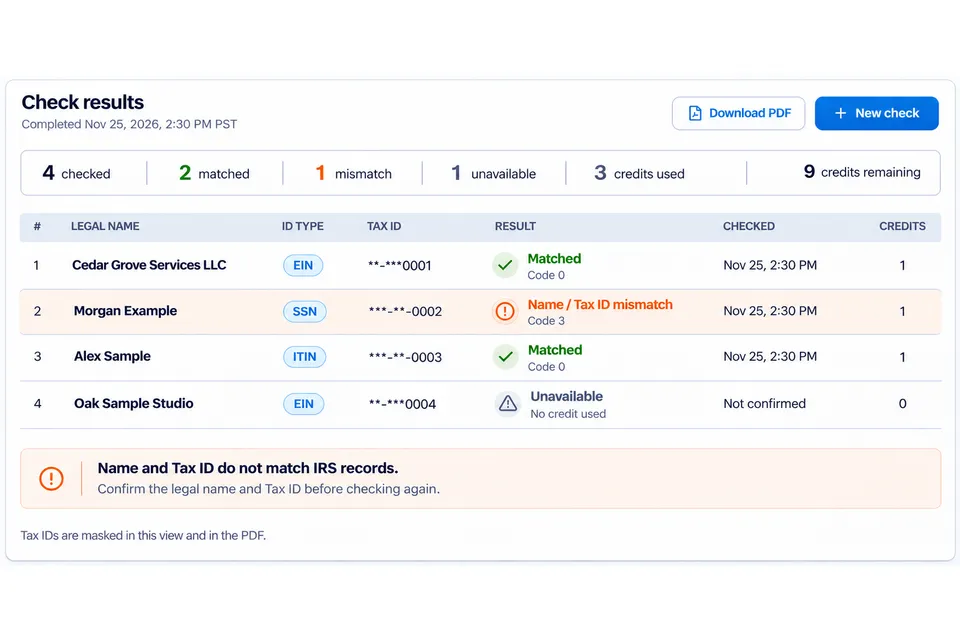
Wait for the checks to finish. Results appear together after every check finishes, with matched, needs-review and unavailable counts.
Choose Print / PDF to preview, download or print the masked report. Keep the page link to reopen the batch; New check starts a blank set of entries.
Check up to ten arbitrary legal-name and EIN, SSN or ITIN combinations and keep a printable report.
Page details and controls
Check Tax ID
Check up to ten arbitrary legal-name and EIN, SSN or ITIN combinations and keep a printable report.
Actions and controls
- Check up to ten arbitrary legal-name and EIN, SSN or ITIN combinations and keep a printable report.
- Refresh reloads the credit balance. Buy credits lets Account Admins and Managers add credits at any time. Clear empties the entry rows. Add row and Remove row adjust the batch without creating a saved record.
If you get stuck
The start request failed or its result is uncertain.
Use Refresh check or Retry original request. The original batch reference prevents another charge for the same request. Avoid creating a new check just to refresh an existing one.
Some results are unavailable.
Read the result and any retry time. No credit is used for an unavailable result. A completed mismatch still uses one credit. Previous verified results retain their original checked date.