
FORM 8027 GUIDE
Prepare Form 8027 online.
Prepare annual establishment records with receipts, reported tips, and tip allocations together.
Food and beverage employers can keep preparation, review, and reporting organized in one place.
TrustpilotRead our customer reviews
What is Form 8027?
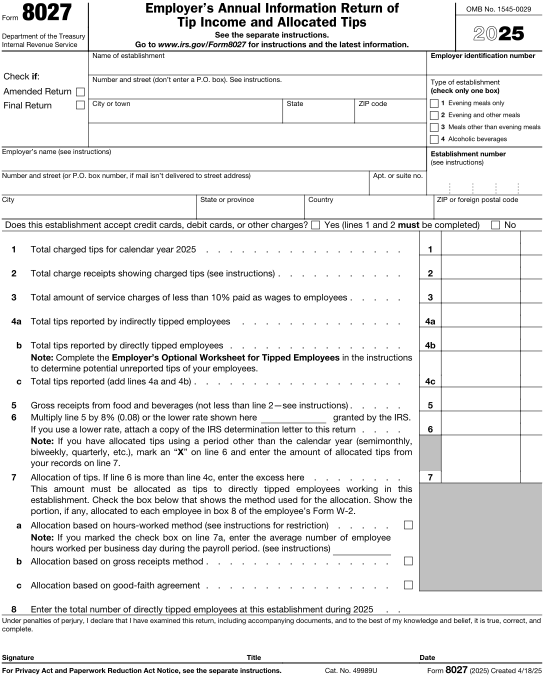
Form 8027 is the Employer's Annual Information Return of Tip Income and Allocated Tips. Applicable large food or beverage establishments use it to report receipts and tips and to determine allocated tips under the reporting rules. The information is organized at the establishment level.
- 1
Employer and establishment
Employer identification, establishment details, and the reporting period.
- 2
Receipts and reported tips
Required gross receipts, charged receipts, charged tips, and employee-reported tip amounts.
- 3
Allocated tips
Applicable allocation method, amounts, and supporting establishment information.
Guides & scenarios
Practical help for your 8027 questions.
Explore the preparation guide and situations that may affect your reporting.

2026 preparation guide
Form 8027 for 2026: A Restaurant Employer’s Checklist
Read guide
Reporting scenario
A New Restaurant Adds Staff: When the First-Year Form 8027 Test Is Met
Read scenario
Reporting scenario
A Restaurant Charges Mandatory Service Fees: Keep Them Out of Reported Tips
Read scenario
Working in E-File Magic?
Find instructions for a recipientWho prepares this form
Built for your 8027 reporting work.
Food and beverage employers
Determine which establishments meet the Form 8027 reporting criteria and maintain separate establishment records where required.
Restaurant payroll and accounting teams
Reconcile gross receipts, charged tips, employee-reported tips, and any allocation calculations before preparing the annual return.
Keep preparation organized.
Prepare the reporting entity and supporting details together. Our team can help you navigate the available form workflow.
Prepare Form 8027 with a clear review process.
Bring the reporting entity and supporting records together before deciding the final submission steps.
- 1
Identify the filer
Confirm the reporting entity and applicable period.
- 2
Gather records
Reconcile the records described in the preparation checklist.
- 3
Prepare the form
Enter the required information for your reporting year.
- 4
Review details
Resolve missing information and check the reporting instructions.
- 5
Confirm next steps
Review the available filing path and retain your records.
Current IRS guidance
Confirm the form's reporting rules and submission requirements.
Plan your deadlines
Keep preparation, filing, and any statement deadlines in view.
Human support
Get help with preparation and the available product workflow.
Preparing a record or PDF does not submit the form or grant an extension. Confirm the applicable IRS submission requirements.
Explore filing servicesFrequently asked questions
Form 8027 filing questions.
Practical answers about employer tip reporting and the next steps in your workflow.
Does every restaurant file Form 8027?
No. The IRS instructions define the large food or beverage establishments that must file and describe exceptions. Review the establishment's operations and employee criteria.
Does Form 8027 replace employee Forms W-2?
No. Form 8027 is an establishment-level annual return. Employee wage and allocated-tip reporting on Form W-2 is a separate obligation.
What information should I prepare for Form 8027?
Employer and establishment: Employer identification, establishment details, and the reporting period. Receipts and reported tips: Required gross receipts, charged receipts, charged tips, and employee-reported tip amounts. Allocated tips: Applicable allocation method, amounts, and supporting establishment information.
How should I check the reporting period?
Use the current form instructions and your entity's source records. A plan year, establishment period, or contract reporting period should not be assumed to match another form's calendar-year workflow.
What should I review before submission?
Reconcile payroll and sales records by establishment and review whether the filing criteria apply.
Is saving a record the same as filing?
No. Preparation and review come first. Confirm the applicable filing method and available services before completing the required submission steps.
Can support help me get started?
Yes. Contact E-File Magic support with your form type and reporting year for help with the preparation workflow and available filing options.
Ready to prepare your 8027 forms?
Bring your records together and take the next step with E-File Magic.