
FORM 1099-MISC GUIDE
File Form 1099-MISC online.
Prepare rents, royalties, and other reportable payments without losing track of their different categories.
Businesses and accounts payable teams can keep preparation, review, and reporting organized in one place.
TrustpilotRead our customer reviews
What is Form 1099-MISC?
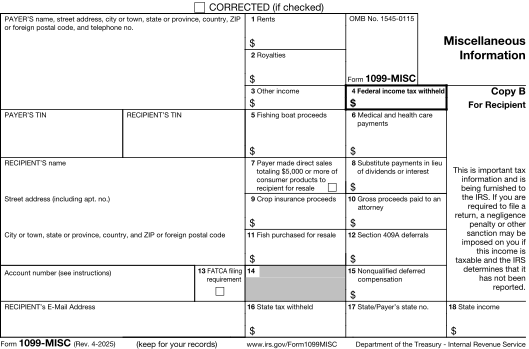
Form 1099-MISC reports certain payments such as rents, royalties, prizes and awards, medical and health care payments, and other miscellaneous income. The payment category determines which fields apply. Nonemployee compensation generally belongs on Form 1099-NEC instead.
- 1
Payer and recipient
Legal names, TINs, addresses, and account references.
- 2
Payment categories
Rents, royalties, prizes, medical payments, and other categories applicable to the transaction.
- 3
Withholding and state details
Federal withholding and the applicable state, payer-number, withholding, and income information.
Guides & scenarios
Practical help for your 1099-MISC questions.
Explore the preparation guide and situations that may affect your reporting.

2026 preparation guide
Form 1099-MISC for 2026: What Payers Need to Report
Read guide
Reporting scenario
Attorney Settlement Payments and Form 1099-MISC for 2026
Read scenario
Reporting scenario
Commercial Rent Paid Through a Property Manager: Who Issues Form 1099-MISC?
Read scenario
More 1099-MISC guides and scenarios (84)
- 1099 CSV Import Errors: Fix Formatting Without Changing Tax Data
- 1099 Software for Accountants: Organize Client Review and Approval
- 1099 Volume Discounts That Grow With Your Firm
- 1099-NEC or 1099-MISC? Classify the Payment Before Filing
- A 1099 Penalty Notice Arrives: Build a Reasonable-Cause Evidence File
- A Business Closes Midyear: Preserve the Final 1099 Filing Work
- A Contractor Supplies the Missing TIN: When Can Backup Withholding Stop?
- A Disaster Disrupts 1099 Preparation: Verify Relief Before Moving the Deadline
- A Fire Delays Rent Statements: Two Separate Extension Decisions
- A Recipient Moved After Filing: Replacement Copy or Corrected 1099?
- A Small 1099 Error: Check the Dollar Safe Harbor and Recipient Election
- A Sweepstakes Awards a Vacation: Report the Prize’s Fair Market Value
- A Vendor Is Exempt From Backup Withholding: Verify the W-9 Claim
- After E-Filing a 1099, Which Copies Go to the Recipient and State?
- Already Using QuickBooks for 1099s? Check What Was Actually Filed
- An Employee Dies Before Final Pay: Prepare the Beneficiary Reporting
- Backup Withholding Deposits and Form 945: Close the Loop Beyond the 1099
- Before Choosing 1099 Software, Check Your Export and Record Access
- Buying a Business: Decide Who Reports the Acquisition Year’s Payments
- Buying Fish for Resale: Keep Supplier Purchases Separate From Crew Shares
- Can I Prepare My Own 1099s? Decide What Help You Need
- Choosing 1099 Filing Software: A Buyer’s Workflow Checklist
- Coin-Operated Amusements: Rental Payments or a Joint Venture?
- Correcting a 1099 Filed With Another Provider: Gather These Records First
- Crop Insurance Proceeds: Review the Farmer’s Capitalization Exception
- Direct Sales for Resale: The $5,000 Checkbox Without a Cash Payment
- Downloaded a 1099 PDF? Check What Still Needs to Be Filed
- Duplicate Vendors in Your 1099 Data: Find Them Before Import
- Electronic 1099 Recipient Copies: Plan Consent and a Mailing Fallback
- Equipment Rental With an Operator: Split Rent From Service Compensation
- Federal 1099 Filing Is Done: How to Review Remaining State Requirements
- Federal Filing, State Reporting and Recipient Copies: Compare Service Scope
- Filing 1099s for Multiple Businesses: Keep Payers and EINs Separate
- First B Notice: What a Business Must Request From the Payee
- Fishing Boat Crew Shares: When Form 1099-MISC Box 5 Applies
- Found an Unreported Vendor After Filing? Review a Late Original 1099
- From Accounting Export to 1099 Filing File: Prepare the Handoff
- How to sign up for E-File Magic and start your first filing
- How to Tell Whether a 1099 Filing Is Finished
- How to Test a 1099 Filing Workflow Before Moving the Full Batch
- Insurance Salesperson Termination Payments: Test the 1099-MISC Exception
- IRS Deadline or Provider Cutoff? Build a 1099 Submission Calendar
- IRS IRIS or a Filing Service? Compare the Work You Must Do
- Literary Agents: Report Author Royalties Before Deducting Commission
- Mailing 1099s to Recipients: Prepare Addresses and Delivery Records
- Medical Research Participant Payments: Keep Incentives Out of the Contractor Batch
- Need to File a Prior-Year 1099? Check Provider Coverage First
- Nonemployee Deferred Compensation: Separate Deferrals From Section 409A Failures
- Nonprofit Honoraria and Speaker Payments: Review 1099-NEC Treatment
- Office Rent and Warehouse Storage: Review the Contract Before Filing a 1099
- Oil and Gas Lease Payments: Separate Bonuses From Production Royalties
- Oil and Gas Working Interests: Why the Royalty Box May Be Wrong
- One Vendor, Both NEC and MISC: Build Separate Totals Without Duplicates
- Only a Few 1099s to File? Choose a Small-Batch Workflow
- Paying a Clinic Incorporated as a Corporation: The 1099-MISC Medical Exception
- Paying a Pharmacy or a Tax-Exempt Hospital: When Medical Payments Are Excepted
- Paying a Service Provider Through an Agent: Who Must File the 1099?
- Paying Damages Directly to a Claimant: Which Amounts Belong on 1099-MISC?
- Preparing 1099-MISC Online: Reconcile Each Box Before Submission
- Printing 1099 Forms: Plain Paper, Preprinted Forms and Copy A
- Property Managers: Reconcile Gross Rent Before Deducting Your Fees
- Public Housing Rental Assistance: Prepare the Landlord’s 1099-MISC
- Qualified Settlement Funds: Who Reports the Claimant Distributions?
- Questions to Ask 1099 Filing Support Before Deadline Week
- Rejected 1099 or Incorrect Accepted Return? Choose the Right Next Step
- Sales-Contest Awards: When a Prize Belongs on 1099-NEC
- Scholarship or Payment for Services? Keep the Award Out of the Wrong 1099 Batch
- Second B Notice: Why Another W-9 Is Not Enough
- Securities Lending: Report Substitute Payments on Form 1099-MISC
- Security by Design: How E-File Magic Protects Your Tax Data
- Spreadsheet or 1099 Software? Decide Where Each Belongs
- Switching 1099 Filing Providers Midseason: A Safe Cutover Plan
- The 2026 1099 Threshold Change: Which Payments Need a Separate Test?
- TIN Matching Flags a Vendor: Resolve the Match Without Inventing a Number
- Tribal Gaming Distributions: Separate Member Payments From Gambling Winnings
- What Does 1099 E-Filing Really Cost? Build a Complete Filing Budget
- What Does IRS Authorized Mean When Choosing a 1099 Provider?
- Why E-File Magic Cannot Correct Forms Filed Elsewhere
- Why E-File Magic? A Filing Management Platform for CPAs and Businesses
- Wrong Payer Name or TIN on a Filed 1099: Avoid the Wrong Correction
- Wrong Recipient Name or TIN on a 1099: Prepare the Correction Review
- Your Accountant Cannot E-File: Review the Information-Return Waiver Rules
- Your Guide to the New E-File Magic and the IRS IRIS Transition
- Your Software Creates 1220 Files. Bring Them to E-File Magic.
Working in E-File Magic?
Prepare a template importWho prepares this form
Built for your 1099-MISC reporting work.
Businesses and accounts payable teams
Review vendor and payee payments by category so rents, royalties, and other amounts are reported in the appropriate fields.
CPA firms and bookkeepers
Organize records for multiple payers and keep each client's payment classifications, recipient details, and delivery choices together.
Import your 1099-MISC data.
Start with a form-specific Excel template or map your spreadsheet columns. Review imported records and complete any missing information before filing.
How to e-file Form 1099-MISC with E-File Magic.
A clear path from prepared records to IRS filing and recipient delivery.
- 1
Add a filer
Set up your business or client and select the tax year.
- 2
Prepare records
Import or enter your recipient and 1099-MISC information.
- 3
Review forms
Resolve validation issues and preview PDFs before release.
- 4
Release an order
Review filing and delivery services, then submit when ready.
- 5
Track progress
Follow order processing, filing, and selected delivery services.
CF/SF e-File
Combined Federal/State e-File with CF/SF program participation for eligible filings.
Recipient delivery
Review PDFs and choose secure e-delivery or Print & Mail.
Tax ID Verification
Add TIN Matching to check eligible names and Tax IDs before filing.
E-File Magic participates in Combined Federal/State filing, which generally satisfies participating states’ requirements for eligible returns. When a separate direct report is required, review the optional State Reporting File.
Explore filing servicesFrequently asked questions
Form 1099-MISC filing questions.
Practical answers about miscellaneous information reporting and the next steps in your workflow.
Can I import Form 1099-MISC data from Excel?
Yes. Use the supported Excel template for your form and reporting year, or map a supported spreadsheet to the available fields. Review the import results and complete any missing 1099-MISC details before releasing an order. You can also enter records directly.
Should contractor payments use Form 1099-MISC or 1099-NEC?
Payments for services by nonemployees generally use Form 1099-NEC when reportable. Form 1099-MISC remains in use for its separate payment categories. Review exceptions and the nature of the payment.
Does every payment category have the same threshold?
No. Reporting thresholds and exceptions depend on the category and tax year. Use the current IRS instructions for rents, royalties, medical payments, and the other categories you are reporting.
When is Form 1099-MISC due?
The regular IRS e-file deadline is March 31 following the reporting year. Recipient copies generally use January 31, or February 15 when boxes 8 or 10 contain amounts. Weekend and legal-holiday adjustments apply. View the due dates page for E-File Magic's service dates, which may be earlier.
Can I deliver recipient copies electronically?
Yes. Eligible recipients with email addresses can receive secure e-delivery, with verification and consent steps in the recipient workflow. Follow delivery and download activity from your account.
Can I add Print & Mail?
Yes. Choose optional Print & Mail when you need physical recipient copies. Review recipient mailing addresses, the selected services, and the order price before release.
How does Tax ID Verification help before filing?
Optional IRS Bulk TIN Matching checks eligible recipient name and nine-digit Tax ID combinations against IRS records. Review the results and resolve mismatches before filing. It does not validate payment amounts or submit the information return.
Ready to prepare your 1099-MISC forms?
Prepare, review, file, and deliver with E-File Magic.