
FORM 5498 GUIDE
File Form 5498 online.
Prepare IRA statements with contributions, rollover information, and year-end account values together.
IRA trustees and custodians can keep preparation, review, and reporting organized in one place.
TrustpilotRead our customer reviews
What is Form 5498?
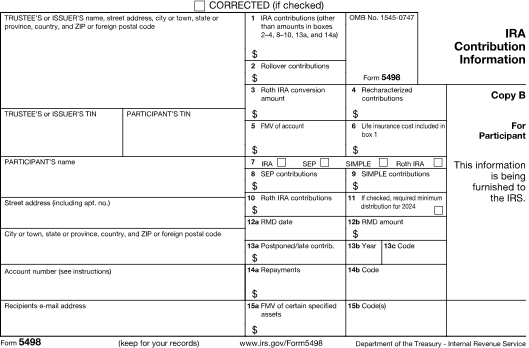
Form 5498 reports IRA contribution and account information furnished by trustees and issuers. Its fields distinguish contribution categories, rollovers, conversions, fair market value, and applicable required minimum distribution information. The contribution year and account type matter when reviewing the statement.
- 1
Trustee and participant
Names, TINs, addresses, and IRA account references.
- 2
Contribution categories
Applicable regular contributions, rollovers, conversions, and other reportable contribution amounts.
- 3
Account and RMD information
IRA type, fair market value, and required minimum distribution details where applicable.
Guides & scenarios
Practical help for your 5498 questions.
Explore the preparation guide and situations that may affect your reporting.

2026 preparation guide
Form 5498 for 2026: IRA Reporting for Trustees and Issuers
Read guide
Reporting scenario
A Reservist Repays an IRA Distribution: Use the Form 5498 Repayment Fields
Read scenario
Reporting scenario
Inherited IRAs: Report Beneficiary Accounts Without Treating Inheritance as a Contribution
Read scenario
More 5498 guides and scenarios (4)
Working in E-File Magic?
Prepare a template importWho prepares this form
Built for your 5498 reporting work.
IRA trustees and custodians
Prepare statements for account owners using contribution records and the applicable account valuation information.
Banks, insurers, and retirement reporting teams
Reconcile traditional, Roth, SEP, and SIMPLE account information with the correct contribution and rollover categories.
Import your 5498 data.
Start with a form-specific Excel template or map your spreadsheet columns. Review imported records and complete any missing information before filing.
How to e-file Form 5498 with E-File Magic.
A clear path from prepared records to IRS filing and recipient delivery.
- 1
Add a filer
Set up your business or client and select the tax year.
- 2
Prepare records
Import or enter your recipient and 5498 information.
- 3
Review forms
Resolve validation issues and preview PDFs before release.
- 4
Release an order
Review filing and delivery services, then submit when ready.
- 5
Track progress
Follow order processing, filing, and selected delivery services.
CF/SF e-File
Combined Federal/State e-File with CF/SF program participation for eligible filings.
Recipient delivery
Review PDFs and choose secure e-delivery or Print & Mail.
PDF review
Check form details and recipient copies before you release an order.
E-File Magic participates in Combined Federal/State filing, which generally satisfies participating states’ requirements for eligible returns. When a separate direct report is required, review the optional State Reporting File.
Explore filing servicesFrequently asked questions
Form 5498 filing questions.
Practical answers about ira contribution information and the next steps in your workflow.
Can I import Form 5498 data from Excel?
Yes. Use the supported Excel template for your form and reporting year, or map a supported spreadsheet to the available fields. Review the import results and complete any missing 5498 details before releasing an order. You can also enter records directly.
Does the IRA owner file Form 5498?
The IRA trustee or issuer reports the account information. The owner receives the statement for their records and tax preparation.
How is Form 5498 different from Form 1099-R?
Form 5498 concerns contributions and account information. Form 1099-R concerns distributions. A rollover or conversion can involve related information on both forms.
When is Form 5498 due?
E-File Magic publishes Print & Mail and e-file service dates for Form 5498 by tax year on the due dates page. Choose your reporting year there; a missing date does not mean there is no deadline. Use the linked IRS instructions to confirm this form's IRS filing and recipient-statement requirements, including any special timing rules.
Can I deliver recipient copies electronically?
Yes. Eligible recipients with email addresses can receive secure e-delivery, with verification and consent steps in the recipient workflow. Follow delivery and download activity from your account.
Can I add Print & Mail?
Yes. Choose optional Print & Mail when you need physical recipient copies. Review recipient mailing addresses, the selected services, and the order price before release.
Can I review the form before filing?
Yes. Review recipient and form details, resolve validation issues, and preview PDFs before releasing your order. Importing data or generating a PDF does not submit the return to the IRS.
Ready to prepare your 5498 forms?
Prepare, review, file, and deliver with E-File Magic.